




Videohub Mini 4x2 12G - Blackmagic
Routers > HD SDI 3G 6G 12G
EAN:9338716009897
€ 499,79 + VAT
€ 609,74 VAT Included
Adcom - Blackmagic
New
Available in 15 days

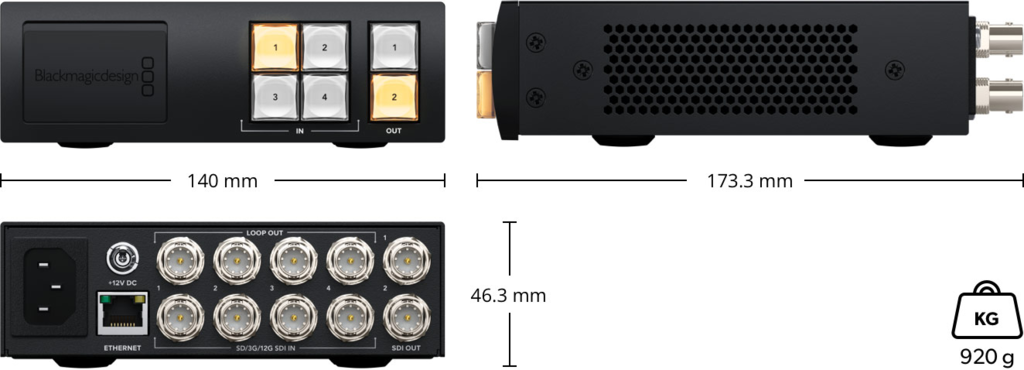
Blackmagic Video Matrix Switcher for SD, HD and Ultra HD with 4 x 12G-SDI Inputs and Loop Out
Small sized video matrix switcher for SD, HD and Ultra HD with 4 x 12G-SDI inputs and a loop out for each, and 2 x dedicated 12G-SDI outputs.
* Includes a front panel control panel with emergency 12G-SDI input and USB-C webcam output.
Front Panel Video Control and Patching
Blackmagic Videohub Mini's front panel control panel is designed for instant switching with dedicated input and output buttons.
To route a video connection, simply press the destination button and then press the source button!
You get complete control over routing, even though these are small switchers designed to fit in portable racks.
The front panel features 12G-SDI video connections for patching external equipment, as well as an input connection that takes precedence over the highest sequentially rear video connection.
There is also a USB webcam output that can be used to connect a computer for recording, plotting or streaming software.
SD, HD and Ultra HD Routing with 12G-SDI Connections
All Blackmagic Videohub Mini models feature advanced multi rate 12G-SDI connections that work with SD, HD and Ultra HD video formats up to 2160p60.
This means you can connect any type of SD, HD-SDI, 3G-SDI, 6G-SDI and 12G-SDI equipment. What's more, Blackmagic Videohub Mini can route different video standards through the same matrix switcher at the same time.
12G-SDI delivers high frame rate Ultra HD over a single BNC connection that works with HD equipment, so you can switch between different video inputs and the SDI output standard will automatically change!
With 12G-SDI connections you have the technology to connect not only to the devices you already own, but also to the ones you want in the future!
Clean switch on each video output
All Blackmagic Videohub Mini models feature a clean switch feature that ensures smooth video transitions when switching sources.
The clean switch feature is special because it doesn't affect the inputs, but each output.
This is important because the re-sync processors needed for the clean switch can sometimes add or remove frames from the video.
This means you can, for example, set a HyperDeck recorder to a non-clean switch feed so you don't get any extra frames, but use the clean switched output associated with a monitor or encoder to seamlessly switch sources.
The clean switch feature connects sources to input 1, or the reference input on the 6x2 and 8x4 models.
SDI Reclocking
SDI reclocking is available on every 12G-SDI input on all Blackmagic Videohub Mini models.
This feature reclocks the video signal to ensure the best possible quality and prevents errors in the SDI data.
This is very important because long video cables tend to degrade the signal.
While expensive high end "digital" cables are preferable, they still do not completely eliminate the problem of loss of signal integrity due to long cables.
With SDI reclocking, all devices in your studio will receive a regenerated and jitter-free signal, so you can run longer cables without interrupting your video.
Emergency Patching with Front Panel Connections
Blackmagic Videohub Mini features 12G-SDI patching connectors on the front panel for direct video access.
No more messing around with cables behind the rack and potentially disconnecting something important!
These connectors are great for adding external gear if something unexpected happens or if you need to accommodate a last minute request for your client.
All models feature a front 12G-SDI input that takes precedence over the sequentially highest rear video input if one is connected.
The 6x2 and 8x4 models also include a 12G-SDI output on the front that matches the video of the sequentially highest output.
The higher inputs and outputs are preferable because they are typically less used on video matrix switchers.
Small sized video matrix switcher for SD, HD and Ultra HD with 4 x 12G-SDI inputs and a loop out for each, and 2 x dedicated 12G-SDI outputs.
* Includes a front panel control panel with emergency 12G-SDI input and USB-C webcam output.
Front Panel Video Control and Patching
Blackmagic Videohub Mini's front panel control panel is designed for instant switching with dedicated input and output buttons.
To route a video connection, simply press the destination button and then press the source button!
You get complete control over routing, even though these are small switchers designed to fit in portable racks.
The front panel features 12G-SDI video connections for patching external equipment, as well as an input connection that takes precedence over the highest sequentially rear video connection.
There is also a USB webcam output that can be used to connect a computer for recording, plotting or streaming software.
SD, HD and Ultra HD Routing with 12G-SDI Connections
All Blackmagic Videohub Mini models feature advanced multi rate 12G-SDI connections that work with SD, HD and Ultra HD video formats up to 2160p60.
This means you can connect any type of SD, HD-SDI, 3G-SDI, 6G-SDI and 12G-SDI equipment. What's more, Blackmagic Videohub Mini can route different video standards through the same matrix switcher at the same time.
12G-SDI delivers high frame rate Ultra HD over a single BNC connection that works with HD equipment, so you can switch between different video inputs and the SDI output standard will automatically change!
With 12G-SDI connections you have the technology to connect not only to the devices you already own, but also to the ones you want in the future!
Clean switch on each video output
All Blackmagic Videohub Mini models feature a clean switch feature that ensures smooth video transitions when switching sources.
The clean switch feature is special because it doesn't affect the inputs, but each output.
This is important because the re-sync processors needed for the clean switch can sometimes add or remove frames from the video.
This means you can, for example, set a HyperDeck recorder to a non-clean switch feed so you don't get any extra frames, but use the clean switched output associated with a monitor or encoder to seamlessly switch sources.
The clean switch feature connects sources to input 1, or the reference input on the 6x2 and 8x4 models.
SDI Reclocking
SDI reclocking is available on every 12G-SDI input on all Blackmagic Videohub Mini models.
This feature reclocks the video signal to ensure the best possible quality and prevents errors in the SDI data.
This is very important because long video cables tend to degrade the signal.
While expensive high end "digital" cables are preferable, they still do not completely eliminate the problem of loss of signal integrity due to long cables.
With SDI reclocking, all devices in your studio will receive a regenerated and jitter-free signal, so you can run longer cables without interrupting your video.
Emergency Patching with Front Panel Connections
Blackmagic Videohub Mini features 12G-SDI patching connectors on the front panel for direct video access.
No more messing around with cables behind the rack and potentially disconnecting something important!
These connectors are great for adding external gear if something unexpected happens or if you need to accommodate a last minute request for your client.
All models feature a front 12G-SDI input that takes precedence over the sequentially highest rear video input if one is connected.
The 6x2 and 8x4 models also include a 12G-SDI output on the front that matches the video of the sequentially highest output.
The higher inputs and outputs are preferable because they are typically less used on video matrix switchers.


